Annotating figures by hand
Generated figures are reproducible but sometimes need a human touch: an arrow pointing at the anomaly, a callout, a bracket over a region. The annotation workflow lets a human add those without giving up regeneration, and warns when the two drift apart.
The workflow
        flowchart LR
  G["figures/name.svg<br/>(generated)"] -- human copies --> A["figures/annotated/name.svg<br/>(edited in Inkscape)"]
  A -- export --> P["annotated/name.pdf<br/>annotated/name.png"]
  P --> L["\teamfig / figure_path<br/>prefer annotated"]
  G -. regenerated later .-> W{{"stale warning"}}
Copy
figures/<name>.svgtofigures/annotated/<name>.svg(same name).Open it in Inkscape. Add arrows, callouts, labels. Use Nimbus Sans 10 pt for any text you add so it matches. The plot’s own text is real text and can be edited too.
Export:
PDF for LaTeX: File → Save a Copy → PDF, or
inkscape name.svg --export-filename=name.pdfPNG for notebooks/docs: Export → PNG at 300 dpi, or
inkscape name.svg --export-dpi=300 --export-filename=name.png
Rebuild.
\teamfig{name}andteamplot.figure_path(name)now use your version.
Agents are instructed never to create, edit, or delete anything under figures/annotated/.
The stale-annotation warning
At every LaTeX build, \teamfig compares file modification times:
Condition |
Meaning |
Message |
|---|---|---|
|
The figure was regenerated after you annotated it; your arrows may point at the wrong place. |
“generated name.png is newer than annotated/name.svg” |
|
You edited the SVG but forgot to re-export. |
“annotated/name.svg was edited after annotated/name.pdf was exported” |
The warning appears in the LaTeX log (Package teamtufte Warning) and as small
red text under the figure in the PDF, so it’s hard to miss and hard to ship by accident:
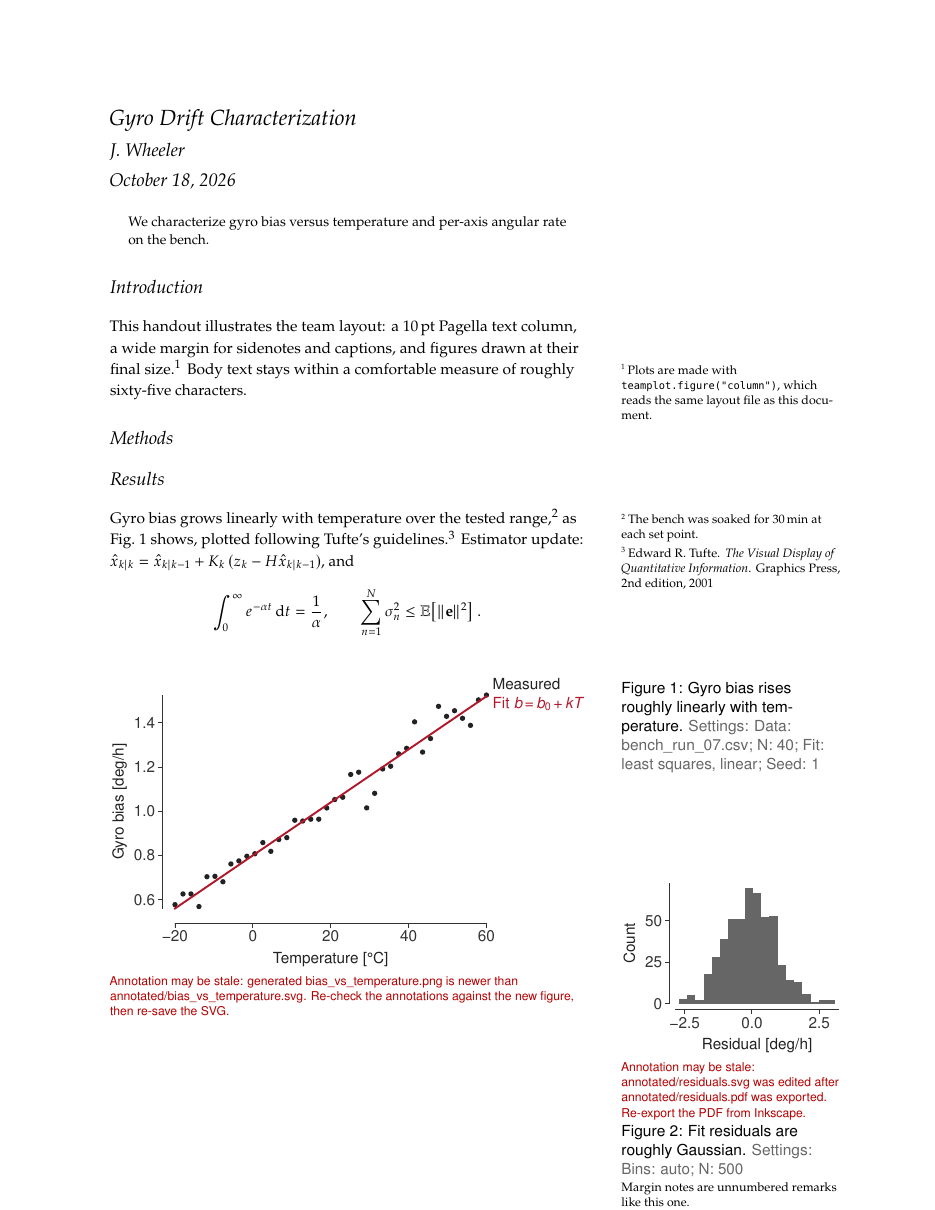
Both warnings rendered under their figures.
To resolve: open the annotated SVG next to the newly generated SVG, move or update your annotations, save, and re-export. Saving updates the timestamp and clears the warning.
Tuning
In the paper preamble (after \usepackage{teamtufte}):
\renewcommand{\teamfigtolerance}{240}  % minutes of slack before warning (default 60)
\teamfigmarksfalse                     % keep log warnings, hide the red notes in the PDF
For notebooks and docs, or in CI, run:
python scripts/check_figures.py # exit code 1 if anything is stale
Why timestamps (and their limits)
Timestamps need no extra bookkeeping and work in any editor. Their limit: re-running
a plot script with identical data still bumps the PNG’s time and triggers the
warning. That’s deliberate. A false alarm costs a glance; a silent mismatch between
annotation and data costs credibility. render_diagrams.py avoids needless bumps by
skipping diagrams whose source hasn’t changed.
Note
git clone and git checkout set file times to “now”, so in a fresh clone every
file looks equally new. Within the tolerance window that’s harmless, but if you see
warnings right after cloning, re-save the annotated SVGs or raise \teamfigtolerance.