Plots
All plots go through standards/teamplot, a small helper module over matplotlib.
It applies the house style, sizes figures to the LaTeX layout, and records the
settings that produced each figure.
The pattern
import sys; sys.path.insert(0, "standards")   # from the workspace root
import teamplot

fig, ax = teamplot.figure("column")           # "column" | "margin" | "full" | inches
ax.plot(T, bias, "o", label="Measured")
ax.plot(T, fit, label=r"Fit $b = b_0 + kT$")
teamplot.label(ax, x="Temperature", x_unit="°C", y="Gyro bias", y_unit="deg/h")
teamplot.rangeframe(ax)                       # optional: spines span the data only
teamplot.direct_labels(ax)                    # labels at line ends, no legend box
teamplot.save(fig, "bias_vs_temperature", settings={
    "Data": "bench_run_07.csv",
    "N": 40,
    "Fit": "least squares, linear",
})
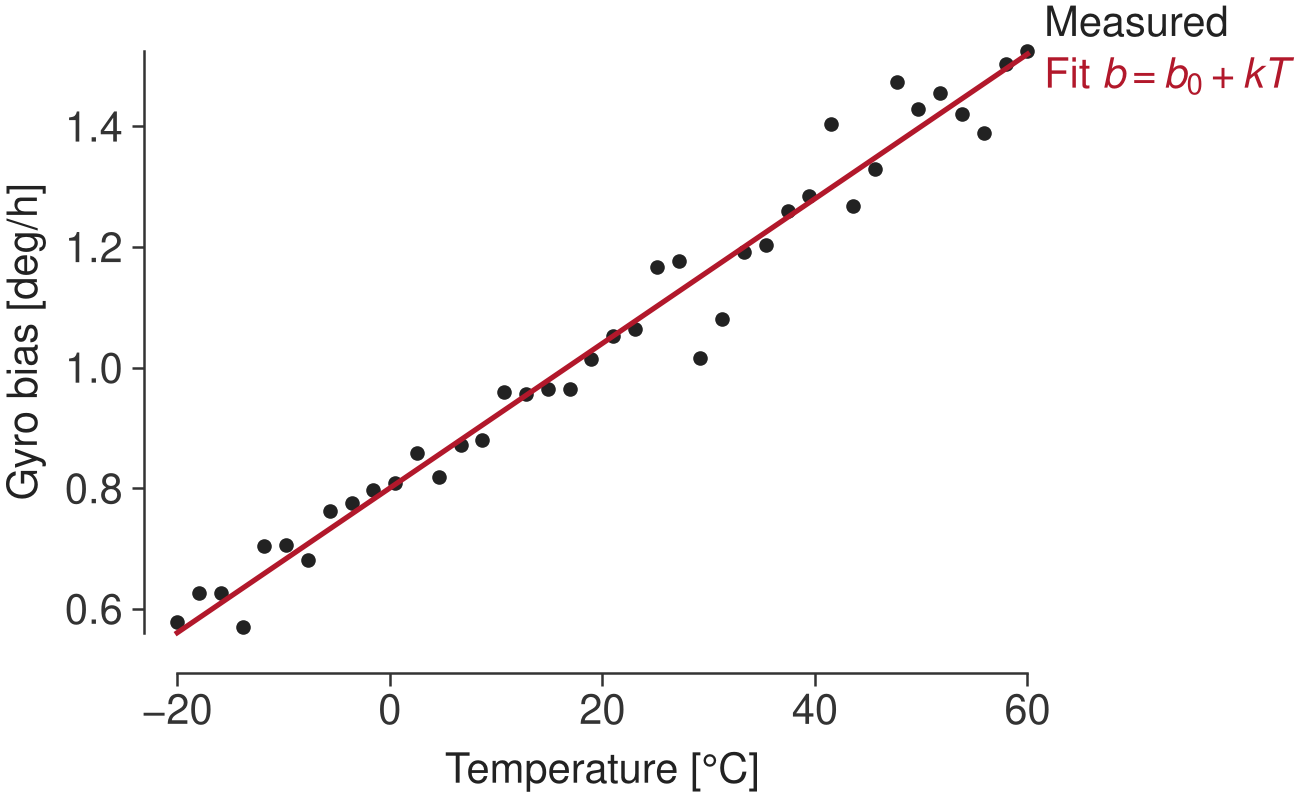
The result: Nimbus Sans 10 pt, no top/right spines, offset axes, range frame, direct labels, near-black first color with a muted red accent.
save() writes:
File |
Used by |
|---|---|
|
LaTeX (vector, fonts embedded as Type 42) |
|
notebooks, Markdown docs (300 dpi) |
|
humans annotating in Inkscape (text stays editable) |
|
machine-readable record of the settings |
|
|
The reproducibility rule
Every setting needed to reproduce a plot must appear in its caption, or in a margin note or footnote next to it.
That means data source, N, sample rates, filter and fit parameters, model choices, random
seeds, and preprocessing. save() warns if settings is empty; agents are told to
treat that warning as an error. In LaTeX, the caption pulls the settings in automatically:
\begin{figure}
  \teamfig{bias_vs_temperature}
  \caption{Gyro bias rises roughly linearly with temperature.
    \figsettingsof{bias_vs_temperature}}
\end{figure}
Sizes: drawn at final size
standards/latex/layout.tex defines the page geometry once:
\def\teamleftmargin{1in}
\def\teamtextwidth{26pc}     % 312 pt, tufte-latex native
\def\teammarginsep{2pc}
\def\teammarginwidth{12pc}
LaTeX uses it to set up the page; teamplot parses the same file (converting TeX
units: 1 in = 72.27 pt, 1 pc = 12 pt), so:
|
Width |
LaTeX environment |
|---|---|---|
|
26 pc = 312 pt ≈ 4.32 in (= |
|
|
12 pc = 144 pt ≈ 1.99 in (= |
|
|
40 pc = 480 pt ≈ 6.64 in (text + gap + margin) |
|
Figures are included at natural size, so 10 pt text in the plot is 10 pt on the
page, matching the 10 pt Nimbus Sans captions. Saving uses bbox="standard" with
constrained layout, so the file is exactly the requested width. Never pass
bbox_inches="tight" or \includegraphics[width=…].
Height defaults to width × 0.618; override with height= or aspect=. Multi-panel:
teamplot.figure("full", nrows=1, ncols=3).
Style: Tufte, in a matplotlibrc
The style lives in standards/teamplot/matplotlibrc (loaded by teamplot.use(),
which figure() calls). Highlights:
Nimbus Sans 10 pt for every text element, including mathtext.
Top and right spines off; left/bottom spines offset 4 pt outward; no grid.
Short outward ticks; frame, ticks, and labels in dark gray, not black.
Color cycle: near-black, then muted red, blue, green, brown, purple, gray. Use in order.
Exception: x/y/z vector components always use
tab:red/tab:green/tab:blue(see below).No legend frame; prefer
direct_labels().PDF/PS fonts embedded as Type 42 (searchable and editable); SVG text kept as text.
To change the style for everyone, edit the matplotlibrc in the template and release; see Maintenance.
x/y/z components
Any time a plot shows components of a vector (position, velocity, acceleration, angular rate, magnetic field, frame axes), color them by axis, not by the cycle:
for i, axis in enumerate("xyz"):
    ax.plot(t, gyro[:, i], color=teamplot.xyz_color(axis), label=axis)
teamplot.direct_labels(ax)
Component |
Color |
|---|---|
x |
|
y |
|
z |
|
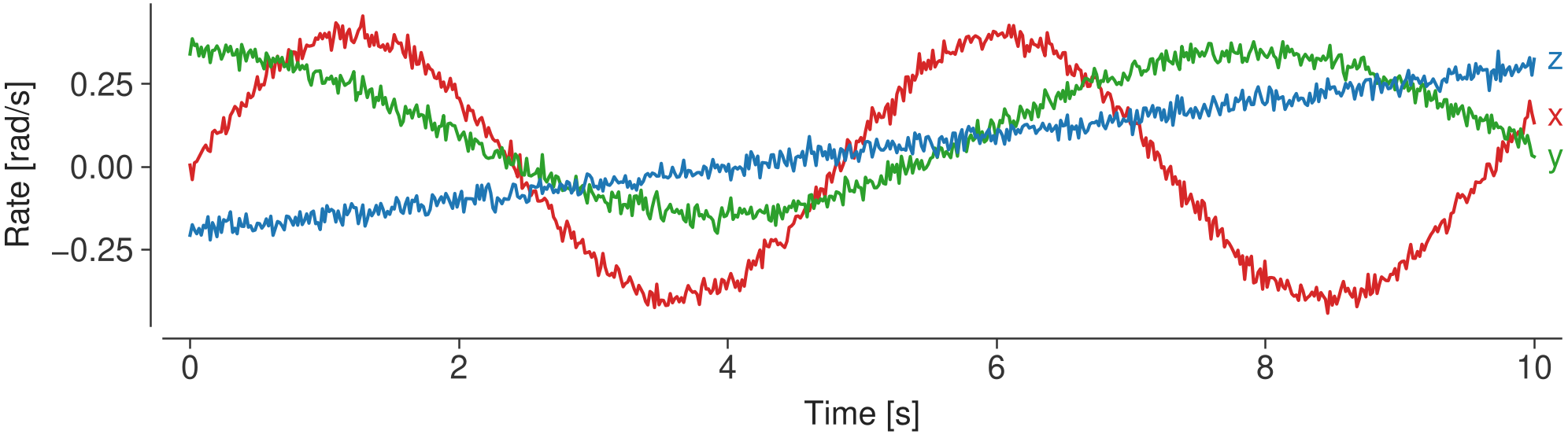
Per-axis angular rate: x red, y green, z blue, labeled directly.
This matches the RGB = XYZ convention of CAD tools and 3-D viewers, and means a
reader never has to check a legend to know which trace is z. The mapping lives in
teamplot.XYZ_COLORS.
Helper reference
figure(width="column", height=None, aspect=0.618, nrows=1, ncols=1, **kw)Styled figure sized to the layout. Returns
(fig, ax)likeplt.subplots.label(ax, x, y, x_unit=None, y_unit=None)Axis labels in
Name [unit]form.direct_labels(ax, pad=4, spacing=1.25)Label each line at its right end in its color; nudges colliding labels apart.
rangeframe(ax, x=None, y=None)Tufte range frame: spines span only the data range.
offset_spines(ax, points=4)Applied automatically by
figure().save(fig, name, settings=None, outdir="figures", formats=("pdf","png","svg"))Save all formats and the settings files.
xyz_color(axis),XYZ_COLORS"tab:red","tab:green","tab:blue"for"x","y","z".settings_text(settings)"Key: value; …"for notebook/Markdown captions.figure_path(name, ext="png")Annotated version if one exists (warning if stale), else the generated file.
check_annotations(figdir="figures")List stale annotations (also
python scripts/check_figures.py).